An AI assistant can answer a question and still leave you with almost all the work. It can explain how to write a quarterly plan, suggest an outline, or polish a paragraph you paste into chat. But someone still has to find the whiteboard photos, compare the deck with the meeting notes, notice where they disagree, and turn those pieces into a document the team can use. An answer is useful. It is not the same as carrying a responsibility forward.
Comma starts with that distinction. Comma is your 24/7 personal agent. No full stop until it’s done. The point is not that every request can run without supervision, or that a model can replace your judgment. It is that work should have a life beyond the next reply: a place to continue, a visible state, and a way to return to you when a decision belongs to you.
For knowledge workers, that is a practical change in the relationship with AI. Instead of managing an endless sequence of prompts, you can hand over a defined piece of work and follow its progress. Comma works across connected apps and files, your Mac, and its own cloud computer, within the access you provide. It organizes larger requests as Tasks, brings things to your attention through Routines and chat, and leaves room for the human decisions that make work worth doing.
A morning with Comma
Consider a Monday morning. You have set a Routine to bring together what needs your attention across your connected apps before the day begins. The briefing gives you a starting point rather than asking you to open every inbox and project tool first. Among the things you need to handle is the Q4 plan: a document assembled from a recent whiteboard session, a board deck in Google Drive, and notes from earlier planning meetings.
This is an illustrative scenario, not a customer case study. The Q4 request is grounded in the example shown on Comma’s official homepage; the conflicting priorities and review exchange below illustrate why human decisions still matter. They are not a claim that this exact project was completed for a customer, or a guarantee that any collection of files will produce a finished plan. The images in this article are captures of official product demonstrations, not screenshots of our fictional Q4 Task.
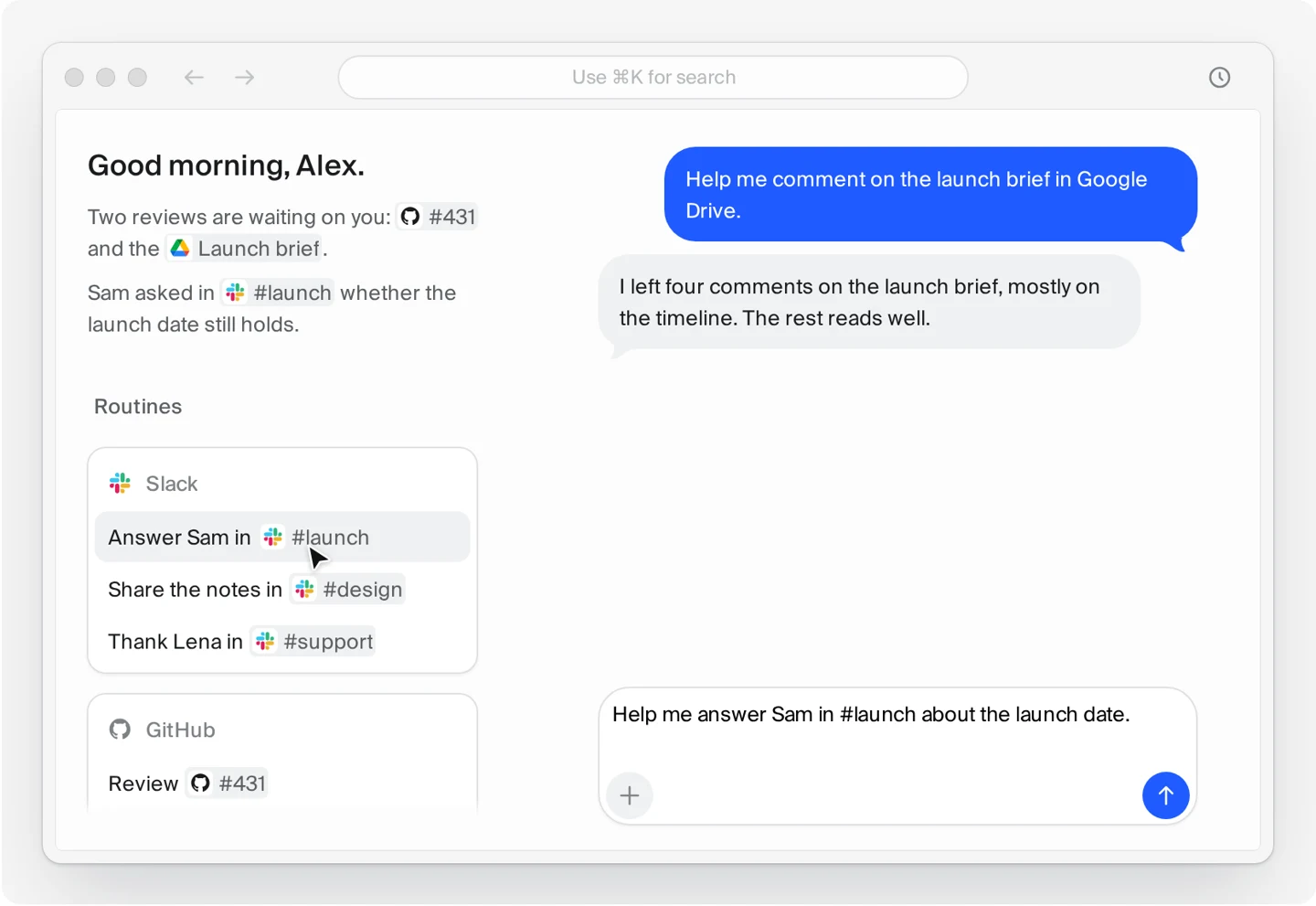
You write: Prepare the Q4 plan from the whiteboard photos, the Drive deck and our prior meeting notes. You supply or select the relevant material, and make the desired deliverable clear: a draft for your team’s review, not permission to publish a final strategy. That distinction gives the work a meaningful boundary. Comma can advance the preparation while the team retains responsibility for deciding what the plan commits to.
The request becomes a Task. Morning briefing has led to a choice, that choice has become ongoing work, and you can now follow the Task instead of keeping a chat window busy. The rest of the story is about what should happen between that initial handoff and the moment a draft is ready to read.
Why chat is not enough
Chat is a natural way to express intent because you can describe an outcome in ordinary language. It is also a good place to ask a quick question, explore an idea, or clarify an instruction. The limitation appears when the conversation becomes the only structure for a larger responsibility. A stream of replies does not, by itself, tell you whether the underlying work is still happening, waiting on a decision, or ready to hand over.
A quarterly plan makes that limitation visible. You are not asking only for good prose; you are asking for a synthesis of materials that may be incomplete, inconsistent, or stored in different places. If you remain responsible for gathering every source, keeping track of every correction, and reminding the assistant what remains unfinished, you are still coordinating the whole job. The assistant has helped with individual steps, but it has not taken on the continuity between them.
This is not a claim that chat-based products cannot have other structures. It is a reason to judge a personal agent by more than the quality of its next answer. Useful assistance and useful delegation overlap, but they are not identical. Delegation needs a visible unit of work, access to appropriate context, and an explicit point at which the agent hands a decision back.
Comma keeps chat as an interface while putting Tasks at the center of larger requests. You can ask naturally without treating a conversation transcript as your project tracker. The value is not simply fewer messages; it is a clearer account of what is being done, what needs you, and what has been delivered.
One agent, one continuing context
Real work is connected even when its files are not. A whiteboard photograph may contain a goal that was discussed in an earlier meeting, while the deck expresses that same goal as a budget line. Understanding the request means bringing the relevant pieces together, not just reading each one in isolation. A personal agent should help maintain that connection as the work develops instead of making you reconstruct the request at every step.
With Comma, larger requests live as continuing Tasks within the agent experience. You can connect the apps and files that matter, supply materials, and refer to earlier work rather than treating every question as a completely separate exercise. That does not imply the agent has access to everything you have ever done, or that it will recall every detail correctly. Continuing context is useful only when it is grounded in the material available to the Task and the instructions you actually give.
In the Q4 example, you identify the deck, whiteboard photos, and prior meeting notes rather than assuming Comma can infer which versions the team considers authoritative. If you later clarify that one priority has been postponed, that clarification belongs to the same piece of work. Its significance is not merely a better sentence in the next response; it changes what the draft should include and how the remaining material should be interpreted.
One continuing context should therefore mean less avoidable reconstruction, not less accountability. You still need to correct a mistaken interpretation or provide a missing source. The advantage is that the correction can advance an existing responsibility rather than starting another disconnected conversation about the same plan.
Ask once, then follow the Task
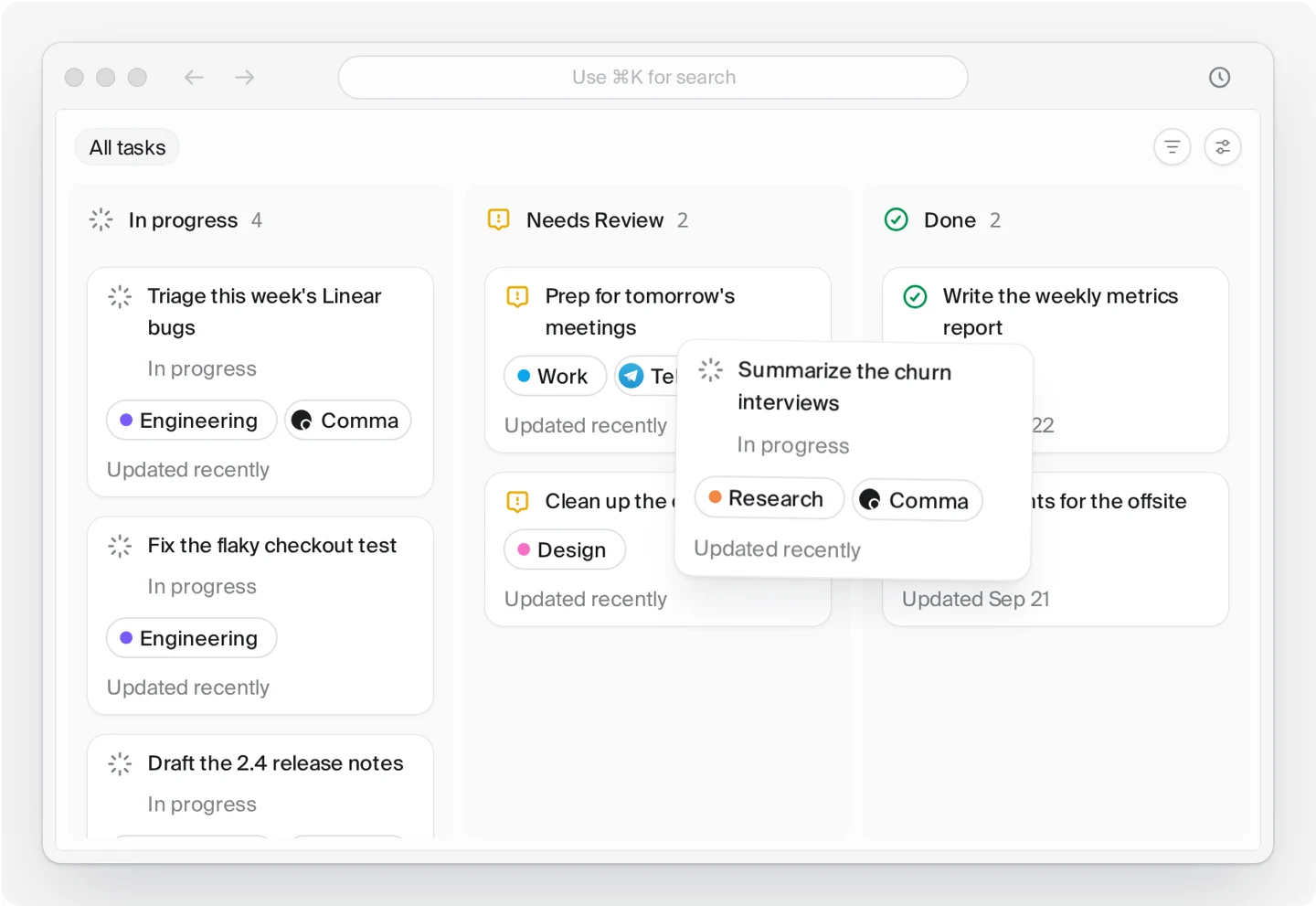
A Task gives a larger request a shape you can inspect. Comma’s public product examples show work moving through In progress, Needs Review, and Done, with the board separating what is running from what waits for you. These states answer a different question from a chat reply. They describe where the work stands, not simply what the agent most recently said.
In progress means Comma is working on the Task.
Needs Review means the work has reached a point that needs your attention or decision.
Done means Comma has finished its current work and delivered the result; it is not a guarantee that the result is correct.
“Ask once” is a way of describing continuity, not a rule that forbids follow-up. A request may need clarification, additional material, or a decision you could not have anticipated at the start. The useful change is that you do not have to send another prompt merely to give the work somewhere to live. You can follow the Task, intervene where it matters, and allow the preparation to continue between those interventions.
Collecting materials and doing cloud work
For the Q4 Task, the first responsibility is to establish the available material. You provide the photographs and identify the Drive deck and meeting notes that should inform the draft. The preparation then involves reading those sources, bringing related points together, and distinguishing proposed goals from commitments already made. The desired outcome is not a pile of summaries; it is a plan whose structure makes the relationship between the sources understandable.
Work that can be done in Comma’s own cloud computer can continue there rather than depending on an open Mac for every step. In our scenario, the relevant material must already be accessible to the cloud work; a photograph stranded only on a closed laptop is not suddenly available because a Task exists. Once the necessary inputs are available, the scenario can progress through organizing the material and assembling a draft in the cloud. This is a choice of working environment, not a promise of automatic migration from one device to another.
Detecting a conflict and asking for review
Suppose the photographs show three priorities, an earlier meeting note postpones one of them, and the deck still includes all three. A fluent draft could hide that disagreement by quietly choosing a version. But choosing the quarter’s priorities is not a formatting decision. It changes the meaning of the plan, and the right answer depends on the team’s intent rather than on which document is easiest to read.
In this illustrative workflow, Comma surfaces the conflicting material and the Task enters Needs Review for your decision. You check the relevant sources and confirm that the postponed priority should remain outside the Q4 commitment. That review is part of completing the work, not evidence that the agent should have guessed instead. A personal agent is more useful when it carries preparation forward without treating authority over your decisions as part of the assignment.
Resuming execution and delivering an artifact
After your response, work resumes with a clearer instruction. The draft can use the chosen priorities, preserve relevant supporting material, and distinguish unresolved questions from decisions already made. You no longer need to reopen the whole request just to explain why one item should be excluded. The same Task connects the original handoff, the review, and the continued preparation.
The delivered artifact is a draft Q4 plan for your review. The scenario does not require inventing a particular export format, an automatic approval trail, or a publishing integration to explain the outcome. Comma hands back the work and marks the Task Done; you open the result and evaluate it. Delivery closes the agent’s current work, while human review determines whether the plan is ready for the team.
Works where the work already lives
Knowledge work crosses boundaries that are easy to underestimate. The request begins in a conversation, its evidence lives in files, and some of the work may require a computer rather than another message. If an agent cannot reach the relevant places, you become its courier. Comma’s public description connects these environments: apps and files you connect, your Mac, and its own cloud computer.
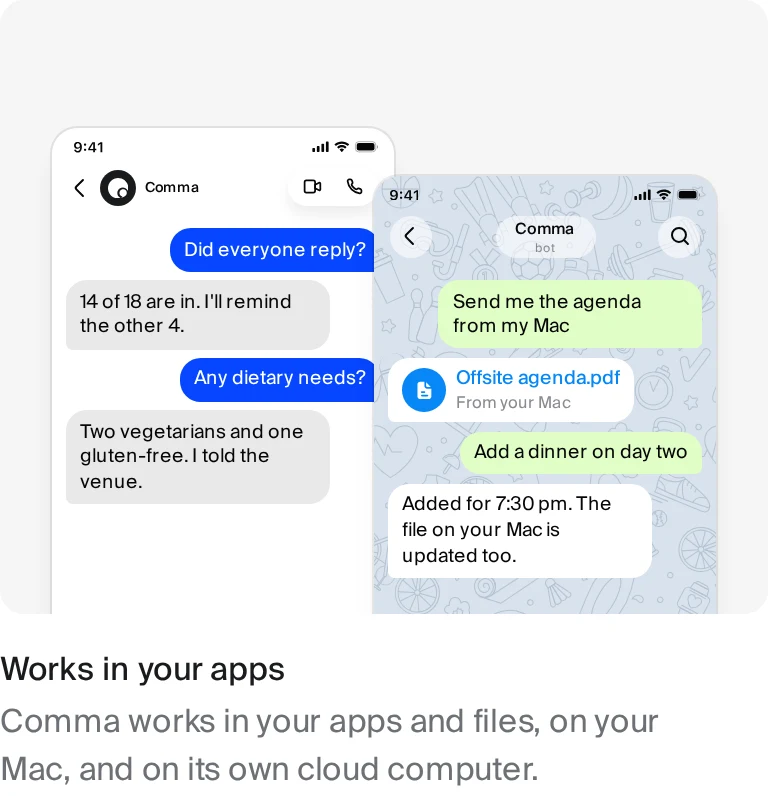
Connected apps and files
Connections make existing material available within the access you authorize. They do not remove the need to identify the right project, supply missing context, or decide whether a document is current. In the Q4 workflow, selecting the deck and relevant notes is part of a good handoff. An agent working with the right sources has a better basis for preparation than one asked to fill gaps with plausible assumptions.
Using the hosted service does not change that responsibility. You do not need to run the infrastructure yourself, but you still need to set up the experience and authorize the apps you want to connect. The docs are the place to check current setup guidance and availability. A product overview should not suggest that every account, app, and file becomes accessible immediately after signing up.
Your Mac, with permission
Comma’s Mac access is read-only by default. That boundary separates understanding local material from changing your machine. If the work requires modifying files or running commands on the Mac, you must enable Allow operations. A request to prepare a draft does not, on its own, erase that permission boundary.
This distinction matters even when an operation seems mundane. Reading notes to inform a plan and editing the source deck are different actions with different consequences. You can want help with the first without authorizing the second. Treating access and operational permission separately gives you a way to delegate useful preparation without silently extending the assignment to local changes.
A cloud computer, with a real boundary
Comma also has its own cloud computer, and its official homepage demonstrates a metrics-report request being worked on there. Cloud work can continue when the Mac is closed if it does not depend on local-only files or recordings. That qualification is essential: a cloud computer is another working environment, not a way to access unavailable inputs by implication. The Q4 Task can continue with material already accessible there, but local dependencies still need to be addressed.
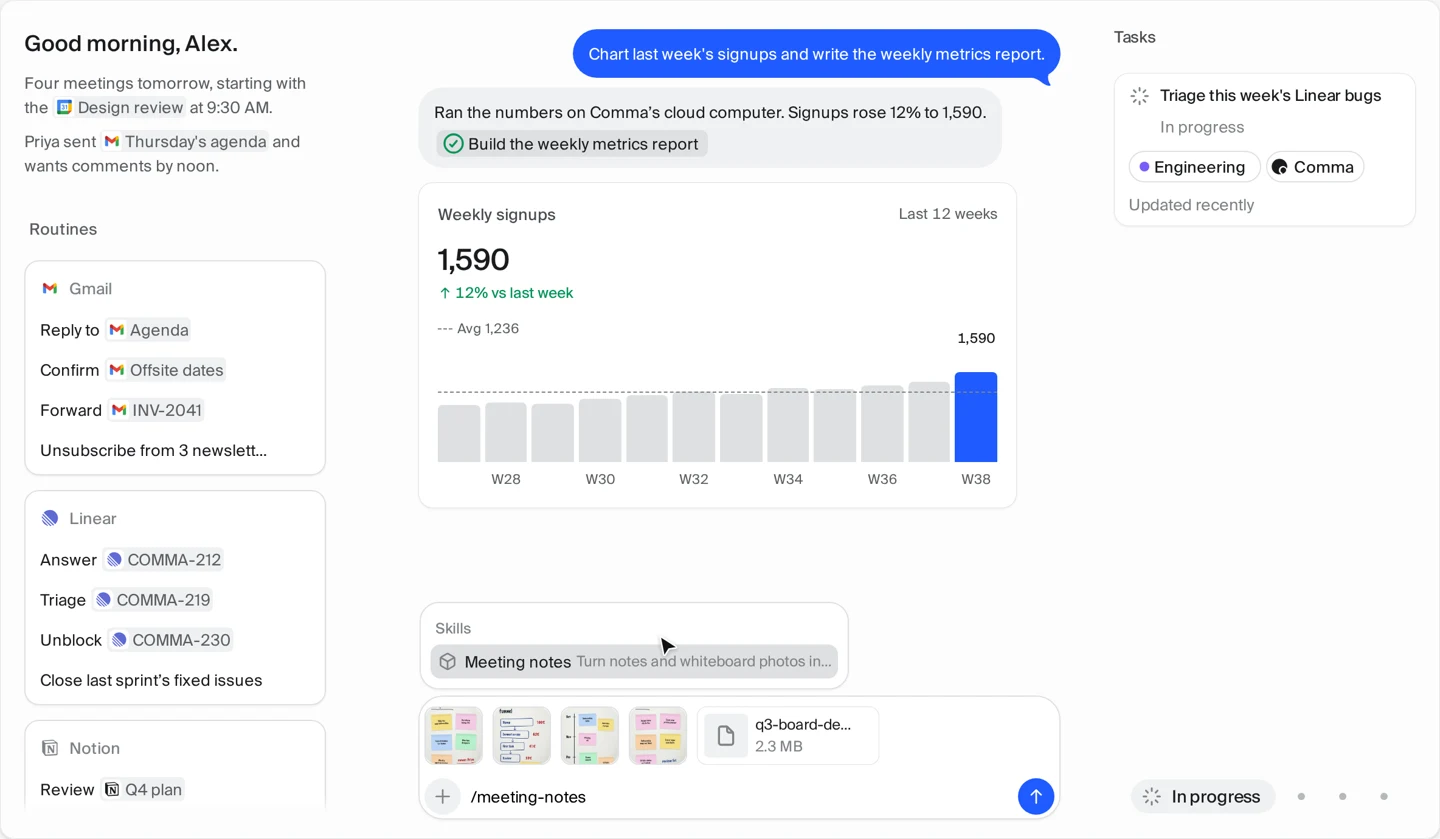
The benefit is continuity where the dependencies permit it, not a claim that the laptop never matters. Before closing the Mac, consider whether the Task needs anything that exists only on that machine. For the broader picture of how Comma runs ongoing work, the agent page explains its always-on approach. The product consequence is simple: work can continue without a fresh chat prompt, while access and available inputs still set its limits.
Remote handoff from Signal or Telegram
Work does not always arrive while you are at your desk. Comma supports remote task handoff through Signal and Telegram, giving you a way to ask from a familiar chat app. The official Signal example shows a request for a summary followed by a request for a PDF. That is a product demonstration of handoff and delivery, not proof that every reader’s connection is already configured.
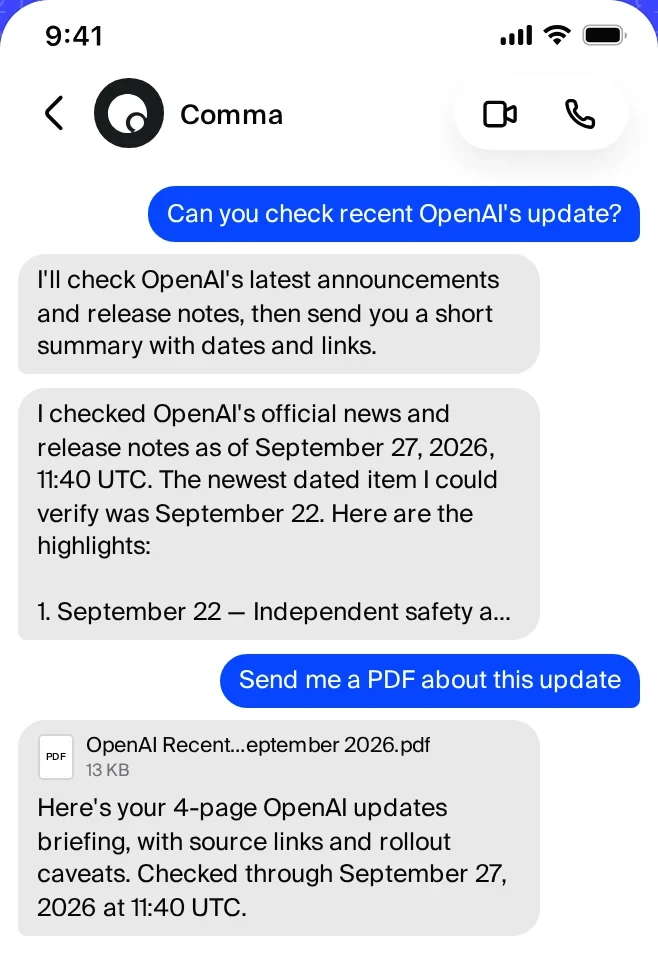
For our Q4 scenario, a phone is another possible place to give an instruction; it is not a shortcut around review or Mac permissions. A message sent remotely cannot make an unavailable local recording accessible, nor should it imply approval of decisions you have not considered. The public chat-app documentation currently notes that setup steps are coming soon. Check that guidance rather than treating the screenshot as a connection tutorial.
Proactive, without taking the user out of control
An agent that only moves after another prompt still leaves you responsible for remembering when attention is needed. An agent that treats every signal as permission to act creates a different problem. Comma’s approach separates noticing, suggesting, working, and asking for a decision. Those are related responsibilities, but they should not collapse into one indiscriminate notion of autonomy.
Routines are the scheduled part of that relationship. At a time you set, Comma brings together the things needing attention across connected apps so you can choose where to begin. The morning briefing is useful because it creates a starting point for judgment, not because it makes every choice for you. In our scenario, you select the Q4 plan as the work to prioritize; the briefing does not approve the plan’s contents.
Comma can also write first in chat when something important needs you and suggest a next step. Its official homepage shows a moved meeting and an offer to draft a reply, followed by a draft that has not been sent. That example illustrates why initiative and control can coexist. Noticing a change can be proactive, while deciding what to do with it remains an explicit part of the interaction.
The same distinction applies inside a Task. Discovering a conflict can advance understanding without authorizing Comma to choose your strategy. Needs Review provides a visible boundary when the next step belongs to you, and Allow operations remains the boundary for local changes. Always-on describes continuity and attention; it is not a promise that all actions happen without approval.
A personal agent should still belong to you
The more work an agent carries, the more reasonable it becomes to ask who controls the system and where its records live. Personal assistance should not require treating those questions as somebody else’s concern. Comma is a free and open source personal AI agent, with code available under AGPL-3.0 in the official GitHub repository. That gives users a concrete place to inspect the project and understand its development.
Open source is not a security certification, a guarantee of correctness, or a claim that operating a service has no costs. It is a statement about the availability and license of the code. For a product that works with personal and professional material, that distinction matters: ownership should be discussed in terms users can examine, not converted into an absolute promise about risk.
Comma offers hosted and self-hosted paths. Hosted means you do not have to run the infrastructure yourself; app connections still require authorization and initial setup. Self-hosting uses Docker Compose and puts the service under your own operation. The self-host page describes that path and the responsibilities that accompany it.
With self-hosting, data stays in your own database and model calls go to the provider you configure. Bringing your own model provider is a choice about where model requests go, not a claim that nothing ever leaves your server. The practical tradeoff is control in exchange for running and maintaining your deployment. You can choose the path appropriate to your situation without needing this brand introduction to turn into an infrastructure manual.
What “done” means
Return to the Q4 plan. The Task has moved from the morning request through source collection, cloud preparation, conflict detection, your review, resumed work, and delivery. Comma marks it Done when its current work is finished. You then read the draft as the person responsible for deciding whether it is ready to use.
That final step is not optional merely because a status is green. Done is a system state, not evidence that every statement is true, every source is current, or every business decision is sound. Check important numbers against their sources, make sure the priority decision is reflected, and look for assumptions that should be made explicit. A quarterly plan can affect other people’s commitments; its significance is exactly why an agent’s delivery deserves human review.
The promise of a personal agent is therefore more precise than “AI handles everything.” Comma can carry preparation and execution forward, keep larger requests visible as Tasks, and return decisions to you when needed. You remain responsible for the consequences of important work. Help that respects that division is more credible than help that hides it.
Try Comma, Now.
Start with one bounded piece of work whose materials and desired outcome you can identify. Connect the relevant apps, provide the sources, and ask for a draft you can evaluate. Follow the Task, answer its review requests, and read what it delivers before using it. A Routine can then give the next morning a clearer starting point, rather than turning every day into another round of reconstructing context.
Try Comma, Now. Explore the docs, or choose the self-hosted path if you want to run it yourself. Comma is your 24/7 personal agent. No full stop until it’s done — with work that continues, decisions that remain yours, and a result worth opening to review.